
You can check your UAE visa status free, in minutes, through the federal ICP Smart Services portal using just your passport number. Here’s what the check actually looks like, step by step.
Open the ICP Smart Services file validity page, select “Passport Information”, enter your passport number exactly as printed, and click “Search”. Re-check the number character by character if you get no result — a single wrong digit is the most common cause, not a system fault.
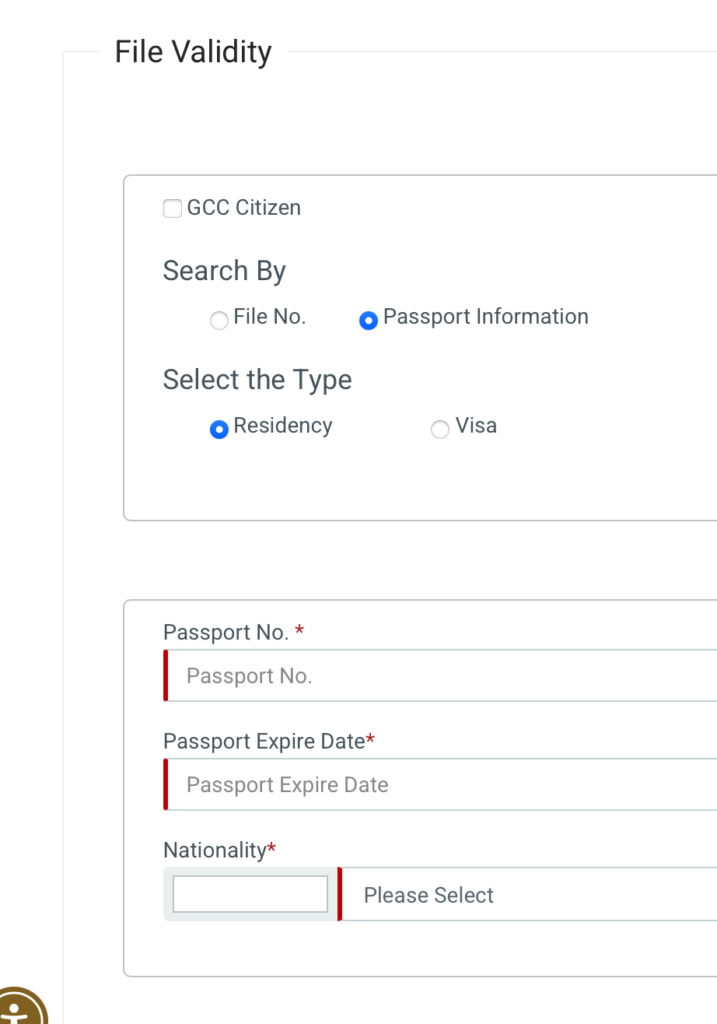

The first screenshot above shows the file validity search screen, where you pick “Passport Information” and enter your number. The second shows a completed result: your visa type, issue date, expiry date, and current status all on one line. That status field is the one to read carefully — a visa can still show a future expiry date while carrying a status that flags a pending cancellation or processing hold, so don’t stop at the date alone.
It’s a free federal service — if a third-party site asks you to pay for a “visa status lookup”, it isn’t connected to the official ICP database, and shouldn’t be trusted with your passport number either. If your result comes back anything other than active or valid, don’t wait: contact ICP directly, or GDRFA Dubai for a Dubai-issued residency, before it affects a flight, a renewal, or a bank KYC update. For what each status actually means, the documents behind it, and what HR teams should do for a whole workforce, see our full UAE visa status guide.




1 thought on “UAE Visa Status: How to check it online using your passport number in 2026”